

In Part 1, I showed how to build a second brain with Claude Code — folders for structure, markdown for configuration, commands for interaction.
But there’s a gap.
What Memory MCP Adds
Memory MCP is a persistent knowledge graph that runs alongside your second brain.
Files hold content. The graph holds connections.
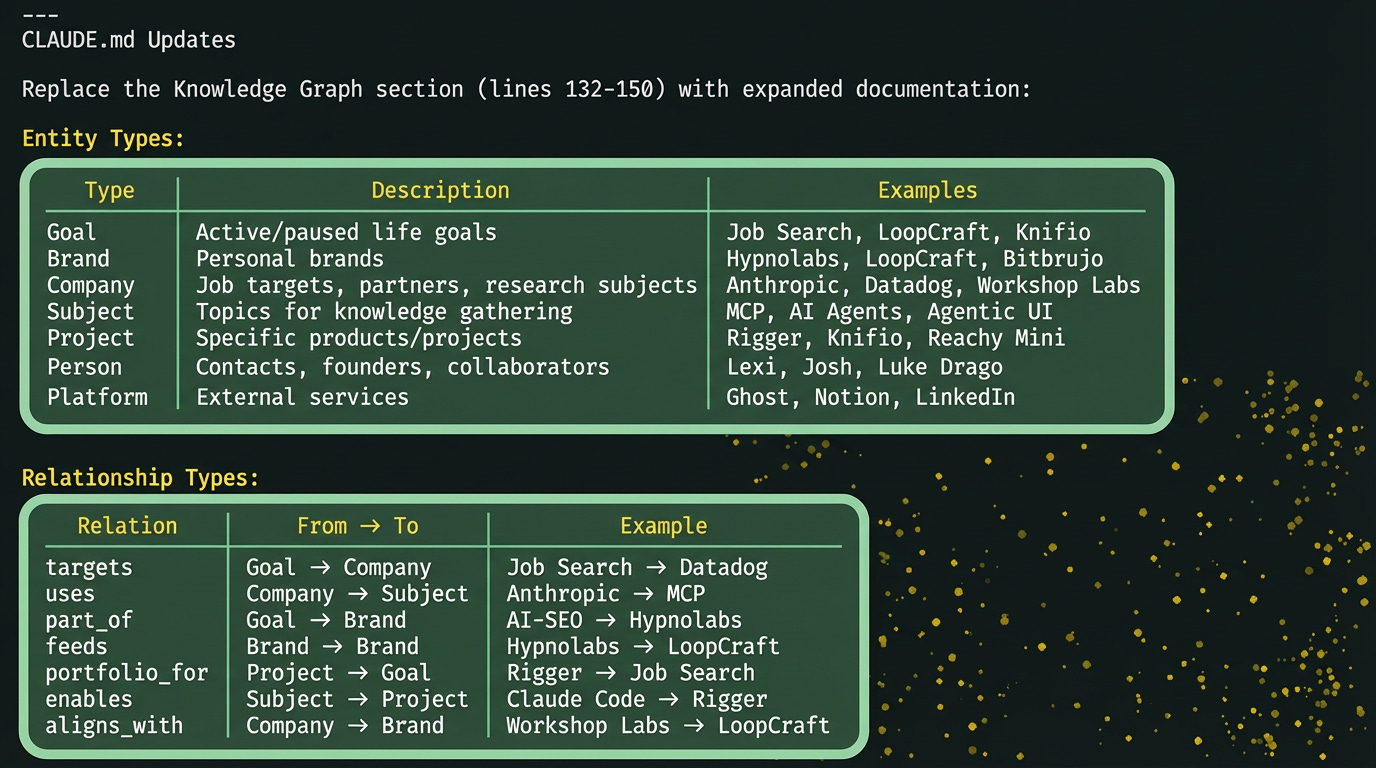
Your goal definitions, research notes, daily briefs — those stay as markdown files. But the relationships between them — which companies connect to which subjects, which goals target which companies, which brands you’re building — those live in the graph.
The graph persists across sessions. Unlike Claude’s conversation context (which resets when you close the terminal), the knowledge graph remembers. You can add an entity today, and Claude will still know about it next week.
The MCP Server I Never Understood
Memory MCP is one of Anthropic’s “reference servers“ — official MCP implementations meant to demonstrate the protocol. I’d seen, but I didn’t get it.
I missed that reference servers aren’t meant to impress you with features. They’re meant to show you patterns. The real value isn’t the server itself — it’s in the example and whats possible when you wire it into a larger system.
Other reference servers worth knowing:
filesystem Read/write local files Safe, scoped file access
fetch Retrieve web content Web research without browser
git Repository operations Version control from Claude
sequential-thinking Step-by-step reasoning Complex problem decomposition
memory looked useless to me but a knowledge graph wired into a second brain — where every command can query it, where gathered news gets filtered through it, where routing decisions use it — like neurons.
Setting It Up
Setting it up takes about five minutes.
Step 1: Install the Server
The memory server stores a JSON file that holds your graph. You configure it in your Claude settings.
Add this to your ~/.claude.json (or the appropriate config file for your setup):
{

  "mcpServers": {

    "memory": {

      "command": "npx",

      "args": [

        "-y",

        "@modelcontextprotocol/server-memory"

      ]

    }

  }

}
Restart Claude Code. The memory tools should now be available.
Step 2: Verify It’s Working
Ask Claude: “Can you read the knowledge graph?”
It should respond with something like:
The knowledge graph is currently empty — no entities or relations yet.
That’s correct. The graph starts blank. You populate it as you work.
Step 3: Add Instructions to Claude
Discuss with Claude how and when to use the graph and ask Claude to store these instructions in the system.
They could go into CLAUDE.md or mixed through the slash commands in an appropriate, planned manor that you can decide.
How It Changes the System
Without the graph, commands work in silos. Your gathering command doesn’t know what companies you care about. Your summary can’t chain relationships. Your inbox processor treats every item the same.
With the graph, commands become aware of your entire context network.
Contextual Surfacing
When news mentions “MCP” or “Claude Code”, the graph can instantly surface connections: Anthropic uses MCP → you’re researching Anthropic → here’s relevant context. Without the graph, that news is just another headline. With it, it’s actionable intelligence.
Relationship Chains
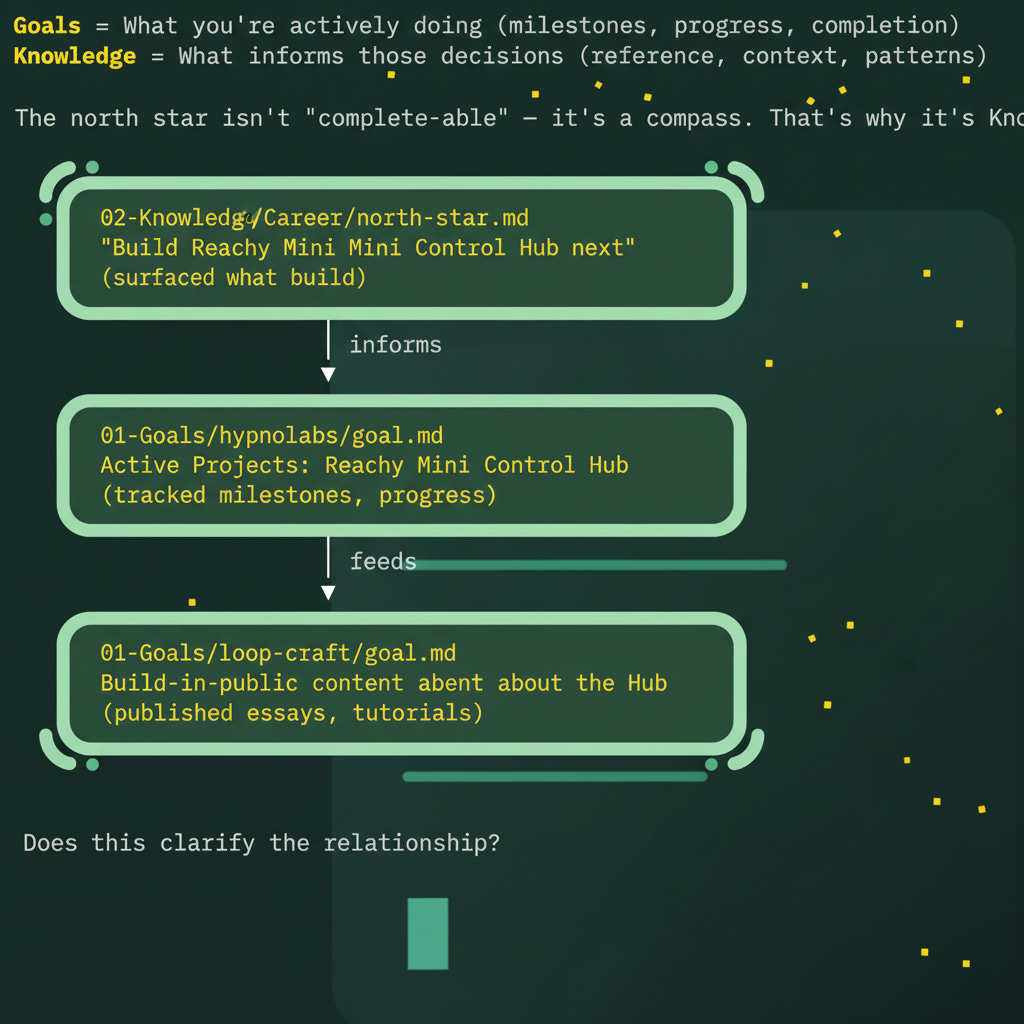
Instead of flat lists, your summaries can show chains:
Smarter Routing
Inbox item mentions “Workshop Labs”? The graph knows Workshop Labs aligns with your LoopCraft thesis AND is a company you’re researching. Routes intelligently instead of dumping everything in the same folder.
Cross-Goal Insights
The graph reveals connections that aren’t obvious from folder structure:
Rigger is a portfolio piece AND demonstrates Claude Code knowledge AND could become LoopCraft content
A robotics company you’re researching also works on embodied AI — relevant to your Reachy Mini project
That newsletter you saved connects to three different active goals
These connections exist in your head, vaguely. The graph makes them explicit and queryable.
Surfacing Forgotten Context
Six months from now, you’ll have forgotten that you researched some company called Workshop Labs back in January. But when you’re reading about AI Safety, Claude can query the graph and surface: “You researched Workshop Labs — they’re working on this exact problem.”
The graph is how Claude remembers what you’ve forgotten.
Growing the Graph Organically
Don’t try to pre-populate the graph with everything you might ever track.
The temptation is to add everything. Resist it. A graph with 500 entities where 400 are noise is worse than a graph with 50 entities that all matter.
Instead, add to the graph as you work and ask Claude to.
Creating a new goal? Add it as an entity.
Researching a company? Add it and connect it to relevant subjects.
Noticing a pattern across projects? Create a relation.
The Tradeoff
Memory MCP adds power, but also complexity. More moving parts. Another thing that could break.
I added Memory MCP because I kept losing connections. I’d research something, save it to a file, and forget it existed until I stumbled across it months later. The graph solves that. If you don’t have that problem, you might not need this.
The Persistence Gotcha
Make sure the graph and the data you make is persisting, or being saved on your computer and accessible across Claude session--especially if you use Docker for MCP Servers as (I did for my memory server). When the container died, so did my graph.
Let Claude Help
You can ask Claude to audit the graph:
“Show me all entities that haven’t been updated in 3 months”
“What relations seem redundant?”
“Which companies am I tracking that I haven’t researched recently?”
The graph is queryable. Use that.
TL;DR
Files hold content. The graph holds connections.
Memory MCP is a persistent knowledge graph that survives across sessions.
Add entities for things you want to track — companies, subjects, goals, brands.
Add relations when you notice connections.
The graph grows organically as you work, not all at once.
Query it when you need context: “What relates to X?”
Setup: Add the memory server to your Claude config, restart, add instructions to CLAUDE.md. If using Docker, mount a persistent file or you’ll lose everything.
When to use: When you need to answer relationship questions that files can’t answer.
Part 1: How to Create a Second Brain with Claude Code
Published on loopcraft.io